Simple Invoice Template Vol-1: Streamlining Your Business Paperwork
There is a specific kind of frustration that comes from sitting down to do your invoicing, only to realize your spreadsheet looks chaotic or your Word document won’t align properly. As a business owner or freelancer, your time is valuable, and wrestling with formatting issues when you should be sending out bills is a drain on your resources. This is why having a reliable, professional, and aesthetically pleasing template isn't just a luxury—it’s a necessity for maintaining your sanity and your cash flow. The goal is to move from "messy" to "organized" without needing a degree in graphic design or accounting software engineering.
The Anatomy of a Professional Invoice
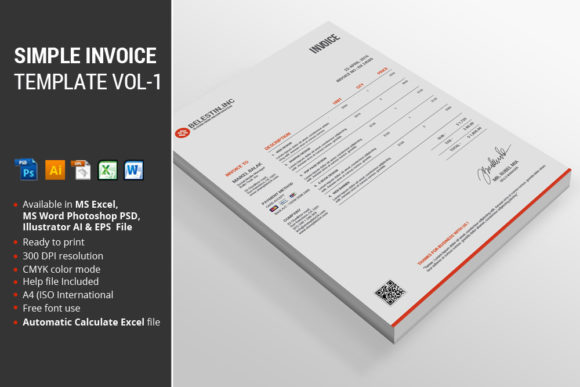
When you download a new design asset, the first thing you want to know is exactly what you are getting. You need tools that work within your current ecosystem, not files that require you to buy new software. The Simple Invoice Template Vol-1 package is curated to ensure versatility across the most common platforms used by designers and business owners alike.
What is included in the package?
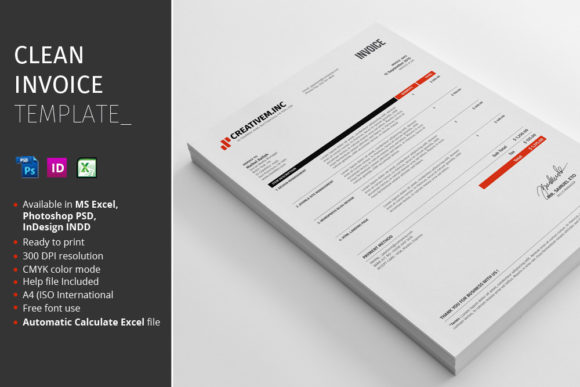
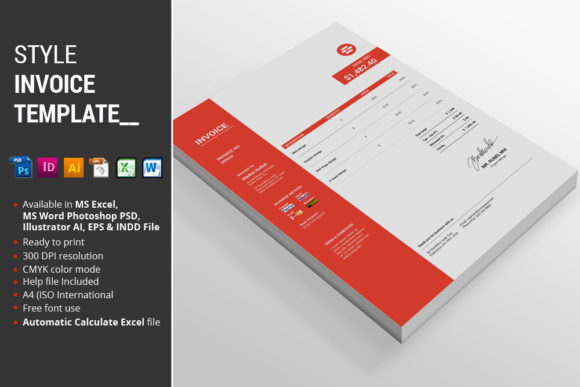
- 1 MS Excel 2010 files: Perfect for those who love the logic of spreadsheets and need automatic calculations for totals, taxes, and discounts.
- 1 MS Word 2010 files: Ideal for text-heavy invoices or when you need to convert the document quickly to a PDF without worrying about cell formulas.
- 1 Photoshop EPS files: For the designers who want to integrate the invoice layout into a broader branding mockup or presentation.
- 1 Illustrator files: The gold standard for vector editing, allowing you to scale elements infinitely without losing quality.
- 1 EPS files: A universal vector format that ensures compatibility with almost any vector editing software.
- Instructions PDF: A dedicated guide to help you navigate the files, install fonts, and edit the templates effectively.
This combination ensures that whether you are a spreadsheet wizard or a visual designer who prefers vector paths, you have a file format that feels native to your workflow.
Visual Appeal and Functional Design
Visual consistency is the backbone of brand recognition. When a client receives a document from you, it should feel like it came from the same entity that designed their website or packaged their product. This template focuses on modern typography and a clean layout that prioritizes readability.
Features:
- Automatic Calculate MS Excel file: This is a massive time-saver. You don't need to be an Excel expert to use it; simply input your hours or unit price, and the totals, tax, and grand total populate instantly.
- Color Variations: The package is available in Red, Blue, Green, and Yellow. This allows you to select the version that best matches your existing brand identity or color palette.
- A4 (ISO International) Size: Standardized for international business, ensuring it prints correctly whether you are in New York, London, or Sydney.
- CMYK Color Mode: All files are set up in CMYK, which is the standard for professional printing. This ensures that the colors you see on screen are what you get in the final print, avoiding those "muddy" or "neon" surprises.
- Fully Organized Layers: For the Illustrator and Photoshop users, the layers are named and grouped logically. This makes customization—like moving a logo or changing a background element—straightforward and frustration-free.
Beyond the Bill: Practical Applications
While the primary function of this asset is billing, the design elements within the Simple Invoice Template Vol-1 can serve as a springboard for other marketing assets. Because the files are fully editable in Illustrator and Photoshop, you can adapt the layout for other stationery needs.
For instance, if you are a small business owner launching a new product line, you can use the template structure to create:
- Letterheads: Match your invoice with a consistent header and footer design.
- Packing Slips: Resize the A4 layout to fit a half-sheet for your shipping boxes.
- Quotes and Estimates: Use the Word or Excel file to create formal price quotes that look just as professional as your final invoice.
- Receipt Templates: Adapt the layout for transaction confirmations.
This approach to brand identity ensures that every piece of paper leaving your office reinforces who you are as a company. It moves you away from generic, default templates that scream "generic" and toward a cohesive visual language.
Ensuring Readability and Professionalism
One of the most common mistakes in editorial design and packaging design is choosing style over substance. An invoice needs to be read quickly. The client needs to see the amount due, the due date, and the payment instructions without squinting.
The Simple Invoice Template Vol-1 balances aesthetic appeal with functional clarity. The layout uses a grid system that separates the "From" and "To" addresses, the line items, and the financial summary. This logical flow helps prevent disputes and ensures faster payment because the client isn't confused by the document's structure.
Furthermore, the Instructions PDF included in the package addresses a crucial technical detail: Fonts Link. Typography can make or break a design. The guide provides the necessary links to download the specific premium fonts used in the design. This is vital because if you open the file without the font installed, your software will substitute it, potentially breaking the layout or ruining the intended aesthetic. Always check the help file first to ensure your typography matches the preview.
Tips for Customization
When you sit down to make this template your own, think about the specific needs of your audience. Are you a creative entrepreneur selling digital products? You might want to emphasize the "Order Number" and "Product Description" fields. If you are a service-based freelancer, you may want to highlight "Hourly Rate" and "Hours Worked."
Don't be afraid to experiment with the color variations. While the Green version might feel "financial" and safe, the Blue version might better suit a tech startup, and the Red version could be perfect for a bold, energetic fashion brand. The goal is to align the document with the psychology of your brand.
Finally, remember that an invoice is often the last touchpoint in a transaction. It is the final impression a client has before they part with their money. By using a clean, organized, and professional template like this, you signal that you are serious about your business, detail-oriented, and worthy of their continued trust.