Clean Invoice Template: A Professional Touch for Your Business Documents
Every client interaction is a chance to reinforce your brand, and that includes the paperwork. A cluttered, confusing invoice can subtly undermine the professionalism you’ve worked hard to build. A clean, well-organized template, on the other hand, communicates clarity, reliability, and attention to detail. It’s a small touch that makes a significant difference in how clients perceive your business.
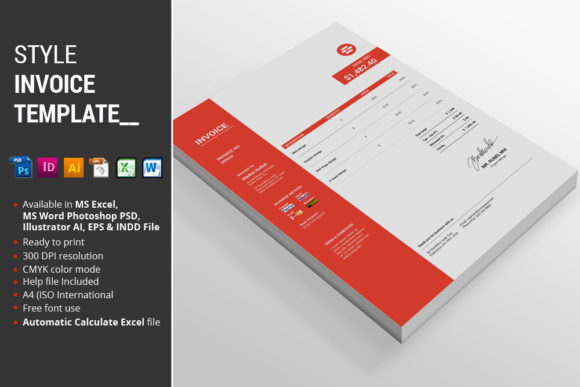
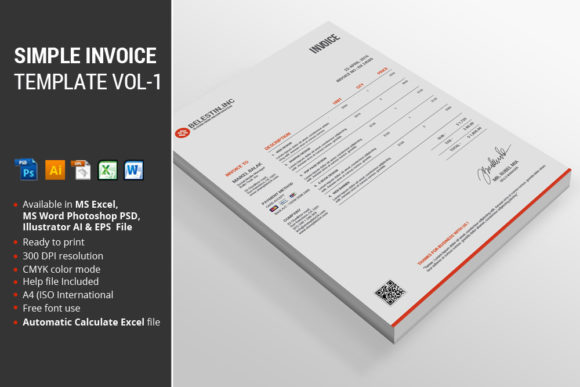
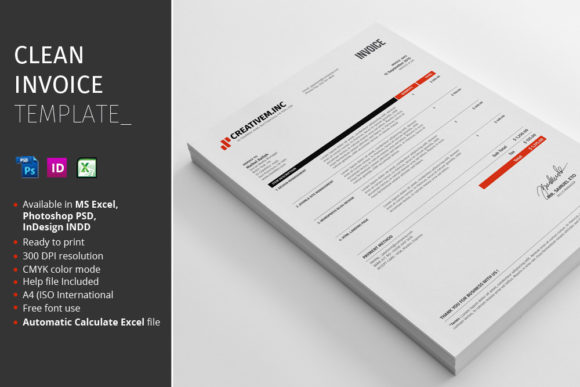
This particular Clean Invoice Template is designed for immediate use and easy customization. It arrives as a comprehensive package tailored for designers, small business owners, and entrepreneurs who need a polished, functional document without starting from scratch. The design prioritizes readability and a modern aesthetic, ensuring your financial communications look as sharp as your other brand materials.
What’s Inside the Package and How It Streamlines Your Workflow
When you download this asset, you’re not getting a single, locked file. The package is built for flexibility across different design workflows and skill levels. It includes:
- 1 MS Excel 2010 File: Perfect for those who need to quickly generate invoices without any design software. The automatic calculation feature is a major time-saver, eliminating manual math errors and speeding up your billing process.
- 1 Photoshop PSD File: Ideal for designers or anyone comfortable with Adobe Photoshop. The fully organized layers make it simple to customize colors, swap logos, and adjust text while maintaining the template’s clean structure.
- 1 InDesign INDD File: For professionals working within the Adobe Creative Suite for larger projects or editorial layouts. This file offers the highest degree of control for fine-tuning every typographic detail.
- Instructions PDF: A straightforward guide to help you get started, including information on the fonts used and links to download them.
This multi-format approach means you can choose the tool that best fits your current project or technical comfort. The inclusion of an A4 (ISO International) size ensures compatibility with standard printing and digital submission formats worldwide.
Practical Applications Beyond Basic Billing
While its primary function is clear, the value of a high-quality template extends into other areas of your visual communication. The clean, modern typography and organized layout make it a versatile design asset.
Consider using it as a foundation for creating other business documents. The same visual language can be applied to:
- Brand Consistency: Using the same design template for invoices, quotes, and purchase orders creates a unified look across all client-facing materials, strengthening brand recognition.
- Internal Documents: Adapt the layout for internal reports, project timelines, or meeting agendas to maintain a professional standard throughout your operations.
- Marketing Collateral: The structure can inspire the design of simple flyers, service menus, or price lists. The principles of clear hierarchy and ample white space are universal in good design.
- Digital Products: If you sell digital goods or services, a well-designed invoice or receipt template enhances the customer’s experience, making the transaction feel complete and trustworthy.
The template’s design serves as a practical lesson in effective communication design. It demonstrates how to organize information logically, use typography to guide the eye, and employ color and space to create a professional impression.
Making It Your Own: Customization and Brand Integration
The true power of this asset is unlocked when you customize it to fit your unique brand identity. The included files are designed to be edited, not just used as-is.
Start with your logo and brand colors. The Photoshop and InDesign files, with their organized layers, make this process straightforward. Swap the placeholder logo for your own and adjust the accent color—available in a professional red—to match your brand palette. This simple change instantly transforms a generic template into a piece of your brand ecosystem.
Next, consider the typography. The package points you to the font links used in the design. Reviewing these fonts can give you insight into the template’s clean aesthetic. You might choose to keep them for consistency or pair them with a complementary typeface from your existing brand guidelines. The key is ensuring the final document is easy to read, with clear distinctions between headings, client information, and line items.
Finally, think about the content structure. While the template provides a standard invoice layout, you can adapt it to include your specific payment terms, late fee policies, or a brief thank-you note. The goal is to create a document that is not only functional but also reinforces your professional relationship with the client.
Choosing the Right Tool for the Job
Deciding which file to use depends on your needs and expertise. If you need to send an invoice in the next ten minutes, the Excel file is your best bet. Its automatic calculations and simple interface are designed for speed and accuracy.
If you’re a designer creating a suite of branded materials for a client, the InDesign file offers the most control. You can integrate it into a larger project, use advanced typographic features, and ensure pixel-perfect alignment.
The Photoshop file sits in the middle, offering visual control for those who are proficient with the software but don’t need the full layout capabilities of InDesign. It’s excellent for creating a visually branded invoice that can be saved as a PDF for digital delivery.
No matter which file you start with, the Instructions PDF is a valuable resource. It outlines the specifications, including the CMYK color mode for print-ready accuracy and the font sources. Taking a few minutes to review it can save you time and ensure your final output meets professional standards.
Investing in a clean, versatile invoice template is an investment in your business’s operational professionalism. It reduces the mental load of creating documents from scratch, ensures consistency, and presents your work in the best possible light. For the busy entrepreneur or designer, that combination of efficiency and polish is invaluable.